Users
Creating Users allows individuals to connect to and use RemotaSafe, with access controls defined individually through security settings. User data can also be used for advanced filtering in sections like Record History and Audit Reports.
How to Access?
To open the user configuration environment, go to: Settings > Users.
Create
To learn how to register a user, see the Create, Edit, and Delete documentation.
Registration Properties
- Name: the user's full name.
- Username: the name used for login or filtering.
- Security: the permissions and access restrictions applied to the user profile.
- Gender: the user's gender.
- Email: the user's email address.
- Password: the password used for login.
- Confirm Password: used to verify the entered password.
- Google Authentication: enable or disable Google SSO for this user.
- Microsoft Authentication: enable or disable Microsoft SSO for this user.
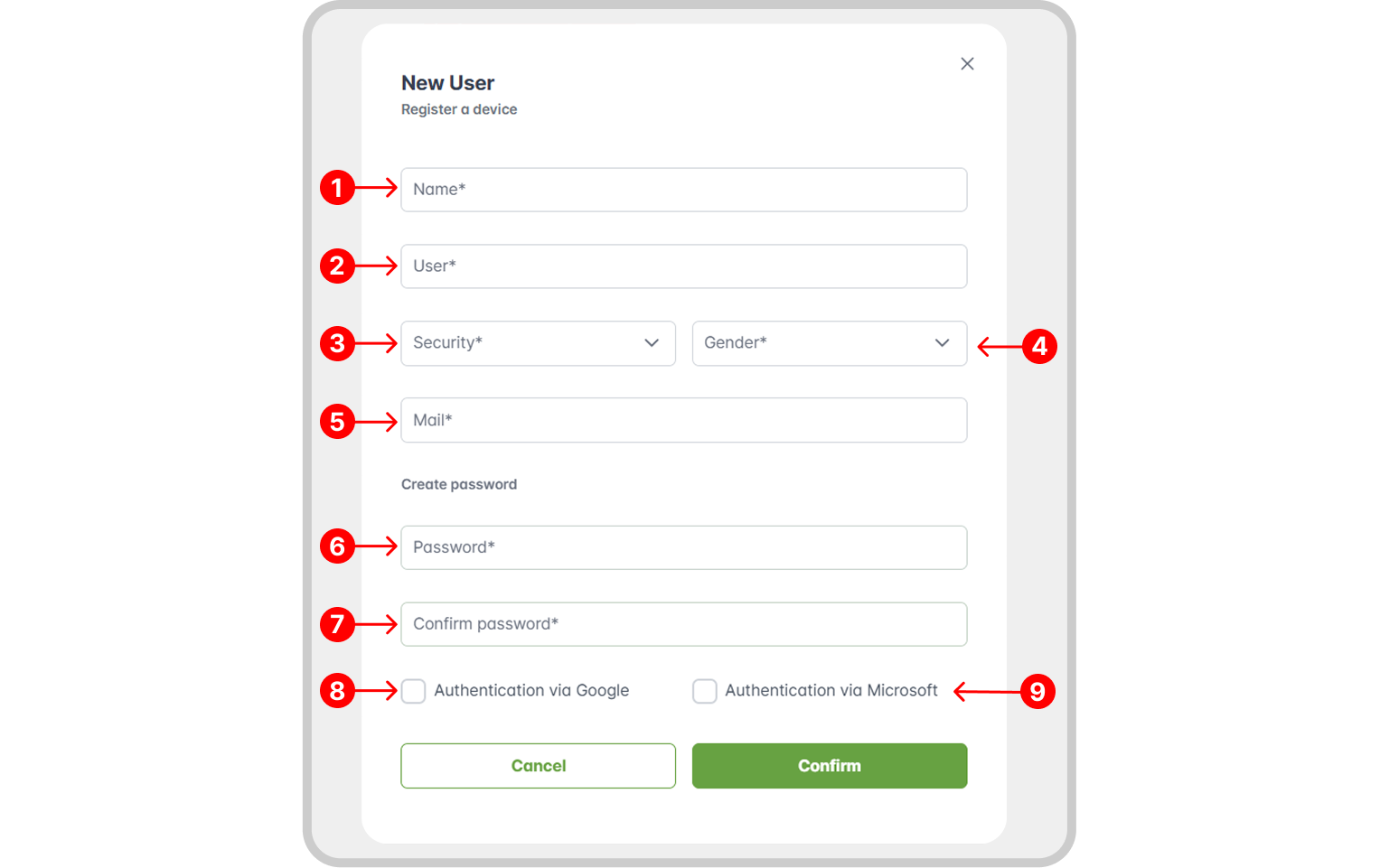
Identity Provider Fields
The Google or Microsoft authentication fields only appear if they are configured.
Edit/Delete
To learn how to edit or delete a user record, see the Create, Edit, and Delete documentation.
Record History
Discover how to access the history of a specific user in the Record History section.