Companies
The Companies context allows for the creation of subsidiaries, which can share license data from the parent company, enabling better control and organizational usage. Additionally, companies can be used as filters in various searches.
How to Access?
Access the company configuration environment at: Settings > Companies.
Create
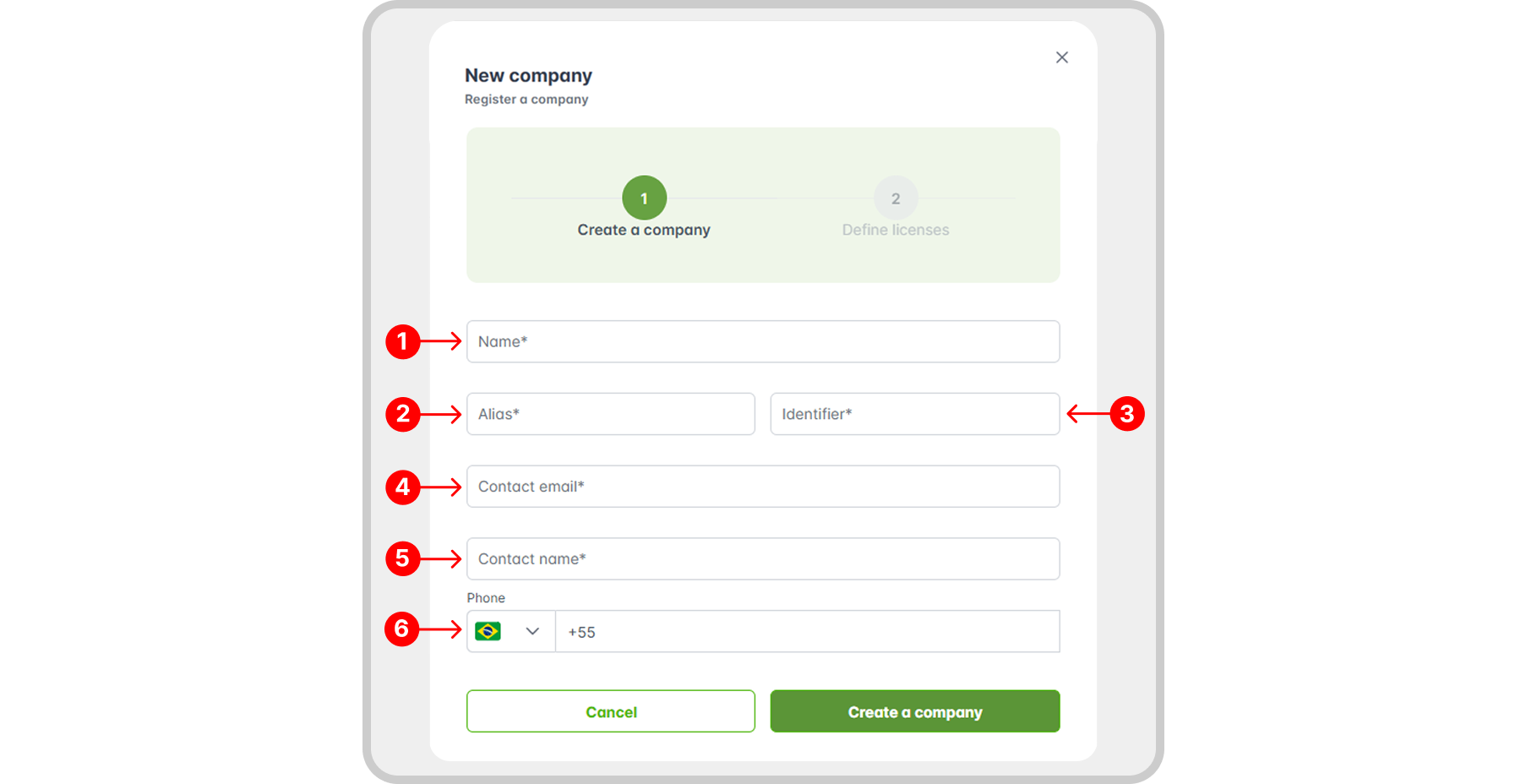
The creation of companies is done in two stages: filling in basic information and License Definition.
To register a company, follow the documentation for Create, Edit, and Delete.
Registration Properties
- Name: the name of the new company;
- Nickname: used in filters and displayed in the top navigation bar;
- Identifier: used for RemotaSafe login in the "Company" field;
- Contact Email;
- Contact Name;
- Contact Phone;
Initial Administrator User
When a new company is created, a default administrator user is automatically generated with the following initial credentials:
- Username: admin
- Password: Txr1001!@
For security reasons, we strongly recommend changing this password upon first login. This measure is intended to protect company data and prevent unauthorized access.
License Definition
To understand how company licensing works and its configuration, see the documentation in the Licensing section.
Edit/Delete
Learn how to edit or delete a specific company by accessing the Create, Edit, and Delete documentation.
Record History
Discover how to access the company record history and its features in: Record History.