General
Within the General settings context, the "General" tab allows you to define basic and advanced configurations related to the company.
Basic Settings
- Time Zone: Sets the time zone used by RemotaSafe for displaying dates and times in reports, records, and notifications.
- Notification Emails: Field for entering email addresses that will receive automatic notifications from RemotaSafe.

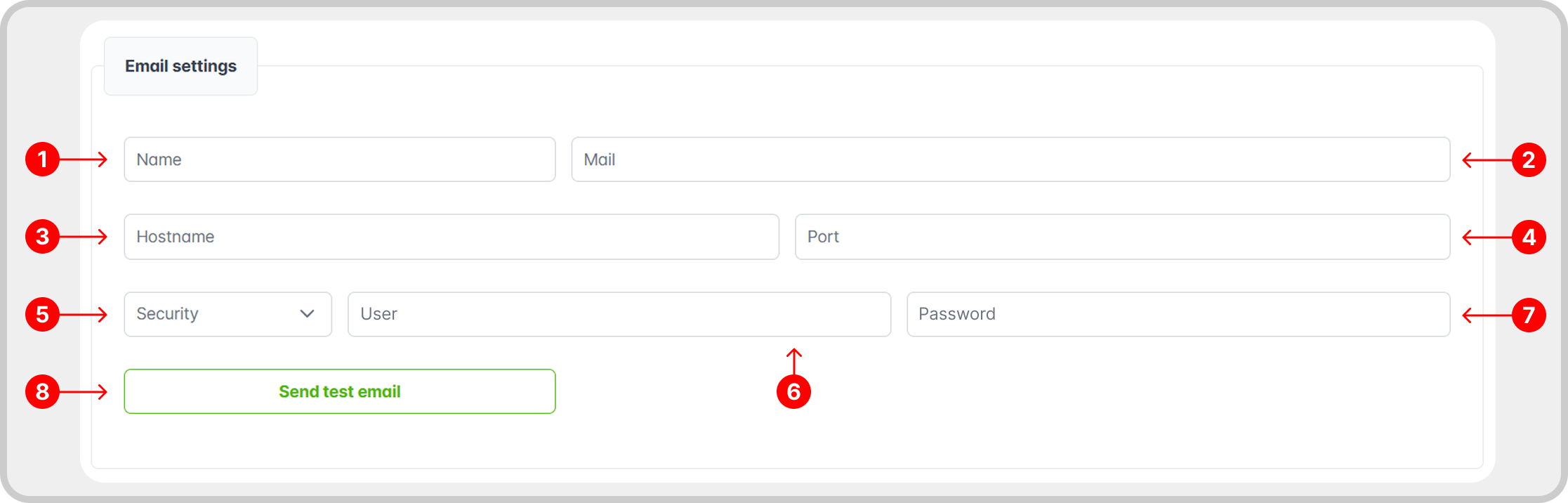
Email Settings
- Name: the display name that will appear to the recipient of emails sent by the system.
- Email: the email address that will be used as the sender for notifications.
- Server: the SMTP server address for sending emails (e.g., smtp.gmail.com).
- Port: the network port number where the email server is configured to receive SMTP connections. Different ports are used for various purposes and security levels (25, 587, 465, 2525).
- Security: the type of encryption used for the connection to the SMTP server.
- Username: the username for SMTP server authentication.
- Password: the password for SMTP server authentication.
- Send Test Email: a button to validate email settings by sending a test message.